The BP_StateMachine is a UObject-derived Blueprint class within the State Manager System for Unreal Engine 5, extending BP_BaseState to serve as a centralized finite state machine (FSM) for managing state transitions in Action RPGs. It enables developers to define complex transition logic between states for actors, such as characters or AI, in response to events or inputs. The class addresses the need for modular, scalable state management, particularly for advanced AI behaviors or dynamic player states, ensuring seamless integration with the BP_StateManagerComponent.
Basic Usage
This section outlines how to use BP_StateMachine to manage state transitions within the State Manager System. The following functions, inherited from BP_BaseState and extended for FSM functionality, are essential for interacting with state machines.
-
CanEnterState:
- Purpose: Checks if the state machine can be entered as a state, typically used for initialization conditions.
- Usage: Override in a custom
BP_StateMachineto enforce entry requirements, returning a boolean. - Example: Ensure the actor is valid before entering the state machine.
-
EnterState:
- Purpose: Executes logic when the state machine is entered, such as initializing the FSM.
- Usage: Override in a custom
BP_StateMachineto set up initial states or conditions. - Example: Set the initial state to
State.Idle.
-
EndState:
- Purpose: Executes cleanup logic when the state machine is exited.
- Usage: Override in a custom
BP_StateMachineto reset FSM-related data. - Example: Clear active state references.
-
Run State Machine:
- Purpose: Executes transition logic to switch between states based on events or conditions.
- Usage: Override in a custom
BP_StateMachineto define FSM transitions. - Example: Transition from
State.PatroltoState.Chaseon enemy detection.
-
Get State Time:
- Purpose: Returns the duration the state machine has been active, if
bTrackStateActiveTimeis enabled. - Usage: Call in Blueprints to query FSM duration for timed transitions.
- Example: Transition after 5 seconds in
State.Idle.
- Purpose: Returns the duration the state machine has been active, if
Key Properties
| Property Name | Purpose |
|---|---|
State Tag | Gameplay Tag identifying the state machine (e.g., StateMachine.Combat), used for triggering or referencing the FSM. |
bTrackStateActiveTime | If true, tracks the active duration of the state machine, accessible via Get State Time. |
Key Concepts
Centralized State Transitions
The BP_StateMachine acts as a central hub for managing transitions between multiple states, unlike BP_BaseState, which focuses on individual state logic. This concept enables developers to define complex FSMs, such as AI behaviors, in a single class, streamlining state management.
- Purpose: Consolidates transition logic for multiple states.
- Usage: Override
Run State Machineto handle transitions based on events or conditions. - Benefit: Simplifies maintenance of complex state-driven systems.
Event-Driven Transitions
The BP_StateMachine responds to events sent via Send Event To State Machine in BP_StateManagerComponent, allowing dynamic state changes. This concept is key for reacting to gameplay events, such as player inputs or AI triggers.
- Purpose: Enables state transitions based on external events.
- Usage: Use
Send Event To State MachinewithEventTagvalues and process them inRun State Machine. - Benefit: Enhances responsiveness to gameplay changes.
Modular AI Behavior
The BP_StateMachine is particularly suited for defining modular AI behaviors, such as boss or enemy FSMs, by managing states like patrolling, attacking, or retreating. This concept supports scalable AI development within the State Manager System.
- Purpose: Facilitates complex AI behavior through FSM transitions.
- Usage: Create a
BP_StateMachinefor AI, overridingRun State Machineto define state transitions. - Benefit: Streamlines creation of advanced, reusable AI logic.
Time-Based Transitions
The bTrackStateActiveTime property and Get State Time function enable time-based transitions within the FSM, such as switching states after a set duration. This concept supports timed behaviors, like delays between AI actions.
- Purpose: Allows transitions based on FSM active duration.
- Usage: Enable
bTrackStateActiveTimeand useGet State TimeinRun State Machine. - Benefit: Simplifies implementation of time-driven state changes.
Hierarchical FSM Design
Complex behaviors can be built by chaining or nesting state machines:
- A top-level AI behavior machine
- Sub-states for movement, alert, idle
- Triggering sub-state machines from parent state logic
→ Run Sub-StateMachine By Tag (e.g., "AI.Alert")AI Behavior Example
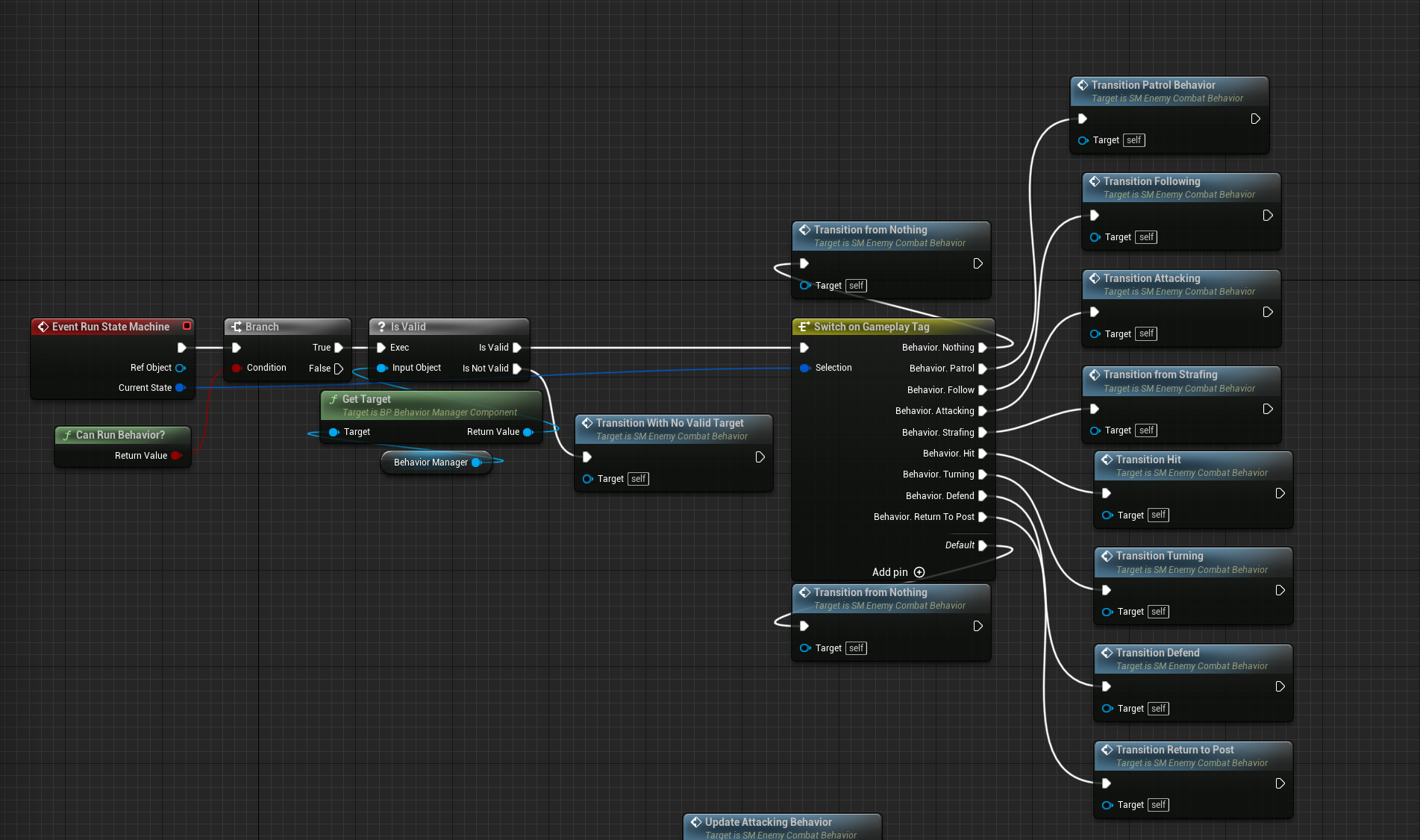
BP_StateMachine is ideal for AI, as shown in the default BP_AIBehaviorStateMachine. It manages transitions (e.g., State.Idle to State.Pursue) based on inputs like enemy detection.
- Usage: Modify
Run State Machinefor AI behavior:
Run State Machine -> Has Input Atom (InputAtomTag: Input.EnemyDetected) -> Branch (True) -> Enter State By Tag (StateTag: State.Pursue)Best Practices
- Workflows:
- Use hierarchical
State Tagnames (e.g.,StateMachine.AI.Behavior) for clarity. - Test transitions with demo
BP_StateMachineassets before creating custom ones. - Use
Send Event To State Machinefor dynamic triggers rather than constant polling.
- Use hierarchical
- Pitfalls to Avoid:
- Don’t overload
Run State Machinewith excessive logic; keep transitions concise. - Avoid duplicating
State Tagvalues across state machines to prevent conflicts. - Don’t call
Run State Machineevery frame unless necessary; use event-driven calls.
- Don’t overload
- Performance Considerations:
- Disable
bTrackStateActiveTimefor state machines not requiring time tracking. - Optimize
Gameplay Tagchecks inRun State Machineto avoid performance hits.
- Disable